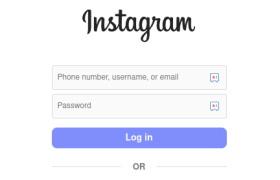
If you opened Instagram for the first time and froze at the login screen — relax. This guide shows the exact paths to sign in on phone and desktop, explains modern options like passkeys and 2FA, and gives no-nonsense fixes for the problems people actually hit.
Step 1 — Open the official Instagram app or website
On mobile: open the Instagram app you downloaded from the App Store or Google Play. On desktop: go to instagram.com/accounts/login. Don’t use sketchy third-party apps or random downloads, they’re a common source of scams. (Yes, this happens.)
Step 2 — Pick the right login method
Instagram lets you sign in with:
- Phone number (the one you registered)
- Email address
- Username
- Linked Facebook account (if your accounts are connected in Accounts Center)
If you can’t remember which you used, try email first — it’s the most common. If that fails, try username or phone next.
Step 3 — Enter credentials (or use passkey)
Type your email/phone/username and password, then tap Log in.
Reality check about passwords: if your password is short or reused across services, stop and fix that. Reused passwords are the main way accounts get taken over. Use a password manager and unique passwords. If Instagram offers a passkey/passwordless option on your device, it’s generally safer and faster — consider switching to it when available.
Step 4 — Complete verification (2FA) if asked
Instagram may ask for a one-time code sent via SMS, email, or generated by an authenticator app. Enter it to finish the login. Two-factor authentication (2FA) makes account takeovers much harder — enable it from Settings → Accounts Center → Password and security.
Step 5 — Post-login: quick safety checks
- Turn on Two-Factor Authentication (authenticator app is better than SMS).
- Confirm the email and phone on your account are current.
- If you see unfamiliar devices in your account, log them out and change your password immediately.
Short FAQ
Q: Can I log in with Facebook?
A: Yes — if your Facebook and Instagram are linked in Accounts Center you can use Facebook credentials to sign in.
Q: What’s better — SMS 2FA or an authenticator app?
A: An authenticator app (or passkeys/hardware keys) is more secure than SMS because SMS can be intercepted. Use an app if you can.
Q: What are passkeys? Should I use them?
A: Passkeys are passwordless credentials tied to your device (biometric or PIN). They’re more resistant to phishing and often faster — use them where supported, but keep a fallback method while adoption finishes.